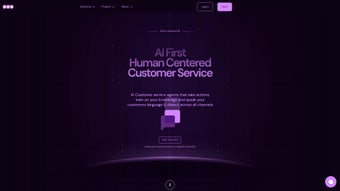

Download DOO – AI‑Driven Hiring Coach, Productivity Booster & Virtual Mentor
Overview: Why DOO Is Changing the Way Companies Hire and Upskill
In today’s fast‑paced business environment, the ability to make hiring decisions quickly and to keep teams operating at peak efficiency can be the difference between growth and stagnation. DOO answers that challenge with a web‑based, AI‑driven platform that places a digital “mate” – a virtual coach – directly into the workflow of talent acquisition, business development, UX research, marketing, fashion, and many other professional domains. Each mate is trained on industry‑specific data, best practices, and real‑world scenarios, allowing users to receive instant, personalized guidance that feels as if a seasoned expert is sitting beside them.
Whether you need help drafting a job description, analysing market trends, refining a UX research plan, or even learning a new programming language, DOO’s AI coaches provide step‑by‑step assistance, relevant resources, and actionable recommendations. The platform’s core promise is to streamline hiring, accelerate professional development, and ultimately boost operational productivity across the entire organization. By merging the speed of artificial intelligence with the depth of human expertise, DOO creates a secure, continuously updated environment where teams can focus on strategic work while the AI mates handle the repetitive, knowledge‑intensive tasks that typically drain time and resources.
This overview will explore how DOO’s architecture, feature set, and user experience combine to deliver a free‑to‑try, secure, and cross‑platform solution that works on Windows, macOS, Android, iOS, and any modern browser.
Key Features That Make DOO a Must‑Have Productivity Tool
DOO’s feature set is designed to replace the endless back‑and‑forth that usually occurs between managers, recruiters, and specialist teams. By embedding AI directly into everyday workflows, the platform eliminates the need for multiple separate tools, reduces context‑switching, and guarantees that every user receives consistent, high‑quality advice. Below is a detailed list of the most impactful capabilities, each crafted to deliver measurable time savings and higher quality output.
- Industry‑Specific AI Mates: Choose from over 20 specialized digital coaches covering talent acquisition, business development, UX research, marketing, fashion, DevOps, language learning, and more.
- Real‑Time Guidance: Get instant feedback on drafts, presentations, and code snippets with suggestions that adapt as you type.
- Secure Cloud Architecture: All data is encrypted in transit and at rest, meeting GDPR and CCPA standards for privacy.
- Cross‑Platform Accessibility: Use DOO on Windows, macOS, Linux, Android, iOS, or any browser without installing additional software.
- Seamless Integration: Connect DOO with popular tools such as Slack, Microsoft Teams, Asana, Jira, and Google Workspace for in‑context assistance.
- Customizable Knowledge Base: Upload company‑specific documents, style guides, or hiring rubrics so the AI mates can reference proprietary information.
- Analytics Dashboard: Track usage metrics, time saved, and hiring funnel improvements directly from the admin console.
- Continuous Updates: The platform receives weekly model refinements and new feature releases, ensuring you always work with the latest AI capabilities.
- Free Tier & Scalable Pricing: Start with a generous free plan, then upgrade to paid tiers that unlock additional mates, higher request limits, and dedicated support.
- Multilingual Support: AI mates converse in 12 languages, making global hiring and collaboration smoother.
Each feature is backed by a robust infrastructure that guarantees low latency, high availability, and compliance with enterprise security policies. Whether you are a small startup or a multinational corporation, the modular nature of DOO lets you adopt only the components you need while keeping the door open for future expansion.
Installation, Usage Instructions, and Compatibility Details
Getting Started – No Complex Installation Required
Because DOO is a web‑based application, the installation process is intentionally frictionless. To download or rather, to start using DOO, follow these simple steps:
- Visit the official DOO website at www.doo.ai and click the “Get Started – Free” button.
- Create a work account using your corporate email address. A verification email is sent to confirm ownership.
- Once verified, you’ll be redirected to the onboarding wizard. Choose the industry mates you need and optionally upload your company’s knowledge assets.
- Configure integrations by connecting Slack, Teams, or your preferred project‑management tool through the “Integrations” tab.
- Invite team members from the “Users” section; they will receive an email invitation with a secure link to join.
After completing the wizard, the platform is ready to use from any modern browser (Chrome, Edge, Firefox, Safari). Because everything runs in the cloud, there is no need to download installers for Windows, Mac, Android, or iOS. The experience feels like a native app thanks to progressive web‑app (PWA) capabilities – you can add a shortcut to your desktop or mobile home screen for offline‑ready access to the UI, though the AI engine still requires an internet connection.
Compatibility Across Devices and Operating Systems
DOO’s architecture is built on responsive design principles and uses WebAssembly for performance‑critical components. The platform officially supports:
- Windows 10, Windows 11 (any recent version of Microsoft Edge or Chrome)
- macOS Monterey and later (Safari, Chrome, or Firefox)
- Linux distributions with modern browsers (Ubuntu 20.04+, Fedora 33+)
- Android 9 (Pie) and newer – via Chrome or the DOO PWA shortcut
- iOS 14 and newer – via Safari or the DOO PWA shortcut
The platform’s security model works the same across all OSes, employing OAuth 2.0 for authentication and supporting SAML or Okta for enterprise single sign‑on. Updates are delivered server‑side, so users always have the latest AI model without needing to manually patch or download new versions. This approach reduces IT overhead and guarantees a consistent, secure experience for every employee, regardless of device.
Pros & Cons – An Objective Look at DOO
Pros
- AI coaches are highly specialized, delivering domain‑specific advice that feels genuinely expert.
- Zero‑install, cross‑platform access removes friction for distributed teams.
- Strong security and compliance posture (GDPR, CCPA, ISO‑27001‑compatible).
- Generous free tier allows small teams to test value before committing.
- Rich integration ecosystem keeps the AI within existing workflows.
Cons
- Reliance on internet connectivity may be a limitation in low‑bandwidth environments.
- Some advanced mates (e.g., DevOps or legal) are only available in higher‑priced plans.
- Customization of AI responses requires initial knowledge‑base uploads, which can be time‑consuming.
- While the UI is intuitive, power users may miss deeper prompt‑engineering controls.
Frequently Asked Questions (FAQ)
Is DOO really free to use?
DOO offers a free tier that includes access to three AI mates, up to 500 AI‑generated suggestions per month, and basic analytics. The free plan is ideal for startups or small teams looking to test the platform. For larger organizations, paid plans unlock unlimited usage, premium mates, and dedicated support.
How secure is my company data on DOO?
Security is a core pillar of DOO. All data in transit uses TLS 1.3 encryption, and data at rest is encrypted with AES‑256. The platform complies with GDPR, CCPA, and ISO‑27001 guidelines. Enterprise customers can enable VPC‑isolated instances and SSO integrations for added control.
Can I integrate DOO with my existing HRIS or ATS?
Yes. DOO provides RESTful APIs and pre‑built connectors for popular HRIS and ATS platforms such as Workday, Greenhouse, Lever, and SAP SuccessFactors. This enables the AI mates to pull candidate data, suggest interview questions, and even draft offer letters directly within your existing system.
What browsers are supported for the best experience?
DOO works best on the latest versions of Chrome, Edge, Firefox, and Safari. Because the UI relies on modern JavaScript features and WebAssembly, older browsers (IE 11, legacy Edge) are not supported.
How does the AI stay up‑to‑date with industry trends?
DOO’s AI mates are powered by continuously fine‑tuned large language models that receive weekly data refreshes from curated industry publications, research papers, and public datasets. Additionally, customers can push new internal documents into the knowledge base, ensuring the AI reflects the latest company policies and market insights.
Conclusion – Boost Hiring Efficiency and Team Productivity with DOO Today
If you’re looking for a secure, AI‑powered tool that can instantly elevate the hiring process, accelerate onboarding, and provide ongoing professional coaching, DOO delivers on all fronts. Its digital mates act as knowledgeable teammates, offering real‑time assistance that saves hours of research and drafting work each week. The platform’s free tier lets you test the core capabilities without financial risk, while scalable pricing ensures that growing businesses can expand the number of mates and integrations as needs evolve. Because DOO runs in any modern browser, you can deploy it across Windows, macOS, Android, and iOS without worrying about patch cycles or device compatibility. The combination of deep domain expertise, continuous model updates, and enterprise‑grade security makes DOO a strategic investment for any organization focused on talent acquisition and continuous learning.
Ready to experience a smarter way to hire and develop your team? Download DOO now, start your free trial, and let an AI mate guide you through your next hiring sprint, market analysis, or UX research project. Transform productivity, reduce time‑to‑hire, and keep your workforce future‑ready with the power of AI‑driven coaching.



.png)



